
KraftGeek Review: JustTap, MagStand & Variety Tripods Compared
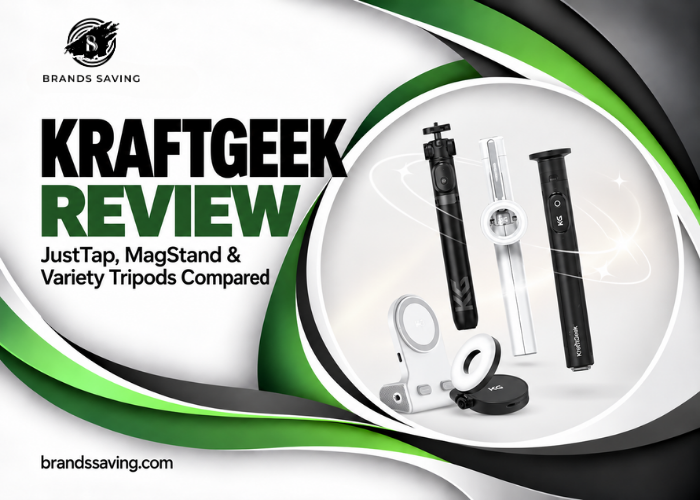
A tripod can be surprisingly frustrating for such a simple accessory. The phone clamp takes two hands, the legs need rearranging, and the camera angle slips just when you have finished framing the shot. This KraftGeek review looks at a brand trying to reduce those small interruptions. Its range includes magnetic phone mounts, tap-to-open legs, and more versatile supports for people switching between devices. Those features have an obvious appeal when you film alone or want to capture something quickly.
But convenience is only part of the decision. You also need to consider your phone case, the size of your bag, the surface you film on, and whether you need support for a camera as well as a smartphone. Below, we compare JustTap Magnetic, JustTap Classic, MagStand, and Variety, then examine pricing, customer feedback, and the purchase terms worth reading before ordering.
Check Today's Price
What Is KraftGeek?
KraftGeek makes portable equipment for content creators, musicians, and artists. Its wider catalog includes lighting, music stands, easels, and accessories alongside phone tripods. The company describes its focus as making creative equipment easier to carry and use, and its About page lists an office in California. These are details supplied by the brand. For smartphone users, the central idea is straightforward: carry a compact support that can move between handheld use and a standing setup.
That serves several audiences. A traveler may want group photographs without handing over a phone. A fitness instructor may need a repeatable camera position. A small-business owner may want to record short demonstrations without balancing a handset against nearby objects. KraftGeek’s appeal is strongest where a conventional photography tripod feels unnecessarily cumbersome, but an improvised phone support feels unreliable.
KraftGeek Tripod Review: Which Model Makes Sense?
KraftGeek JustTap Magnetic Tripod Review
JustTap Magnetic combines tap-to-open legs with a magnetic phone mount. The official specification lists approximately 168 cm maximum height, 455 g weight, and a folded length of 33 cm. A rechargeable Bluetooth remote and adhesive magnetic ring are included. Its main attraction is reducing the steps between taking out the tripod and positioning a phone. That is useful if you frequently switch between holding your handset and placing it on a support. For a creator recording several short clips, fewer mounting adjustments can make the process less distracting. The trade-off is dependence on a suitable magnetic connection. Before buying, establish whether your actual phone-and-case combination will work comfortably. This is the most appealing choice for someone who values fast setup and primarily records with a compatible smartphone.
KraftGeek JustTap Review: The Classic Clamp Version
JustTap Classic retains the tap-to-open mechanism but uses a phone clamp. The published clamp range is 6–8.5 cm, so buyers should measure their phone with its case fitted. The clamp makes this version worth considering when you do not want to add a magnetic ring or change your case.
Its purchase logic is practical: you are paying for easier deployment while keeping a familiar mounting method. For occasional use, magnetic attachment may not offer enough extra convenience to justify choosing it over the Classic. If your phone fits the clamp and your main frustration is unfolding the tripod, this model addresses that problem directly.
KraftGeek MagStand Review
MagStand is another magnetic option, with a published weight of 360 g, folded length of 30.5 cm, and maximum height of 163 cm. Its legs release through a button at the bottom rather than JustTap’s tap mechanism. Its strongest argument is portability. Someone carrying a tripod on a walk or placing it in an everyday bag may care more about size and weight than having the newest deployment feature. The buying decision is therefore less about which product is more advanced and more about whether the smaller package better suits your routine. For a phone-only user who wants magnetic mounting at a lower entry price, MagStand deserves a close look.
KraftGeek Variety Tripod Review
Variety uses a phone bracket and a standard quarter-inch mounting connection. Its published specifications include a 158 cm maximum height, 420 g weight, and 2 kg maximum load. It also offers accessory attachment points. This is the model to examine if your setup changes between a smartphone and other lightweight equipment. A standard connection gives you more freedom to build a modest recording arrangement. However, compatibility still depends on the device, adapter, dimensions, and balance of the complete setup. Choose Variety because you need that flexibility. A phone-only buyer who wants the fastest possible attachment may find a magnetic model more convenient.
Key Features That Matter in Everyday Use
Faster Deployment
The JustTap range’s defining feature is releasing the legs by tapping the base against a surface. The practical benefit is removing one small task from setup. Imagine recording a short introduction, moving to another position, and filming again. A quicker deployment process matters more in that situation than when a tripod remains permanently beside a desk. Still, opening the legs is only the beginning. You must check the footing, set the height, and confirm the framing. Convenience does not remove those basic steps.
Magnetic Attachment
A magnetic mount can make placing and removing a phone easier. Its usefulness depends on the connection between the mount, case, and handset. Treat the case as part of the setup rather than an afterthought. A compatible phone inside an unsuitable case may not produce the attachment you expect.
The most useful pre-purchase question is specific: “Will this work with my phone in the case I already use?” That is more informative than a broad promise of compatibility with an entire phone brand.
Adjustable Height and Framing
An adjustable support lets you choose the camera position rather than adapting your posture to a nearby shelf. This matters for interviews, standing demonstrations, seated tutorials, and photographs with several people. Maximum height is not always the ideal working height. A lower position may suit a seated presentation better, while a standing video may require more extension. The valuable feature is the range of usable positions, not simply the biggest number on the specification sheet.
Remote Shooting
The listed tripods include Bluetooth remote controls. A remote is useful when you are both the subject and the person operating the camera. You can settle into position without repeatedly walking back to the handset. Before recording something important, test the remote with the camera app you intend to use. A successful Bluetooth connection should not be assumed to guarantee every command in every third-party app.
Portability
A support that stays at home cannot improve a photograph taken elsewhere. That makes carry size an important part of value. Consider the length of the bag compartment you will actually use, alongside the weight of your other equipment. For a creator traveling with a phone, microphone, charger, and light, each addition affects whether the kit remains convenient. The right tripod is one you can carry comfortably and deploy often.
First Impressions: Packaging, Design, and Setup
KraftGeek’s online presentation emphasizes clean shapes, concealed components, and a compact appearance. The designs look intended to fit into an everyday creator kit rather than resemble scaled-down studio equipment. However, online images cannot establish finish quality, packaging protection, joint resistance, or how smoothly a unit operates after months of use. This review does not include a verified unboxing. A sensible first setup is uncomplicated. Read the supplied instructions, open the legs fully, keep the support low, and attach the phone before extending it further.
For a magnetic model, test the connection close to a safe surface. For a clamp model, confirm that the phone sits securely without the holder pressing a button. Then pair the remote and record a short sample. This checks the complete experience: fit, framing, control, and basic support. It is more useful than extending the tripod immediately to its maximum height.
Performance: What to Expect in Real-World Situations
Indoor Videos and Tutorials
Stationary indoor recording is the clearest use case. On a level surface, a portable phone tripod lets you repeat a camera position and work without holding the handset. That is useful for lessons, product explanations, outfit videos, and straightforward talking-to-camera content. The expected improvement is consistency. Your framing can remain similar between takes, and your hands are free for the subject you are explaining. A tripod will not improve poor lighting or distant audio. It solves the support problem, leaving those other parts of production to you.
Travel and Group Photographs
For travelers, convenience can matter more than elaborate adjustments. A compact support and remote may make it easier to take a photograph with everyone included. They also reduce dependence on finding a convenient wall or asking a passerby. The practical limitation is finding a sensible place to position the tripod. A crowded walkway, sloping ground, or exposed edge can make a quick setup less appealing. Choose a location with adequate space around the legs before concentrating on the picture.
Outdoor Filming
Outdoor stability deserves realistic expectations. As a matter of practical judgment, a light telescoping support should be used more cautiously as it gets taller, especially when carrying an offset device or accessories. No measured wind-resistance testing was performed for this review. Claims of outdoor versatility should not be interpreted as proof of reliable support in strong wind. For an exposed location, lower the setup or use equipment chosen specifically for those conditions.
Moving Footage
These products should be evaluated primarily as supports and selfie-stick-style tools. They do not become motorized stabilizers simply because they are designed for creators. If walking footage is your main goal, consider whether you need a gimbal or another stabilization approach. If your main goal is recording yourself from a fixed position, a tripod is the more direct purchase.
Long-Term Reliability
Published specifications cannot answer every durability question. Repeated opening, closing, extension, charging, and transport determine how an accessory holds up over time. Joint wear and mechanism reliability require sustained testing. That is why the rating here focuses on design and buying value rather than claiming proven long-term performance.
Pricing and Value Analysis
The reviewed US storefront displayed the following base-product prices:
| Model | Displayed price | Main buying reason |
| JustTap Classic | $29.99 | Tap deployment with a clamp |
| MagStand | $29.99 | Lower-cost magnetic option |
| JustTap Magnetic | $45.99 | Magnetic attachment and tap deployment |
| Variety | $54.99 | More adaptable device connections |
Prices come from the respective official product pages. Bundles, colors, regional storefronts, and promotions may differ. At these prices, the main decision is whether the extra feature changes your routine enough to justify paying more. JustTap Magnetic costs $16 more than the displayed Classic price. That difference is easier to justify if you repeatedly remove and reattach a compatible phone. Variety makes more sense when you need its mounting flexibility. Buying it for that reason is sensible; buying it because it is the highest-priced option is not a useful shortcut.
Discounts and Shipping
The homepage advertised 10% off a first order through footer newsletter signup, plus free shipping on orders over $29. Confirm eligibility, destination coverage, and the final total at checkout. No universal discount code is supplied here because one was not verified. The product pages also displayed conflicting stock messages in the retrieved text. Check the selected variant’s delivery estimate before ordering for a trip or scheduled shoot.
Returns and Warranty
The return policy describes a 30-day window but requires unused items in their original condition and packaging. Customers generally pay return shipping for non-quality issues. This should not be treated as an unrestricted trial period. The separate warranty policy describes one-year manufacturer coverage for most products, subject to exclusions. Proof of purchase is required, and accidental damage is excluded.
Explore BRAND Collections
KraftGeek Pros and Cons
| Pros | Cons |
| Useful choices for different mounting preferences | Model names can obscure important differences |
| Compact formats suited to everyday carrying | Lightweight supports need realistic stability expectations |
| Remote controls help with solo shooting | Camera-app behavior needs checking |
| Accessible starting prices | Bundles can increase the total unnecessarily |
| Variety offers more device flexibility | Compatibility depends on the complete setup |
| Published warranty and return policies | Change-of-mind returns require unused products |
Who Should Buy KraftGeek?
KraftGeek is most appealing to someone recording with a smartphone who wants a dedicated support without carrying conventional photography equipment. Solo creators may appreciate being able to frame a shot, step into position, and operate the camera remotely. Travelers and families may prefer the combination of portability and easier group photographs. A buyer who switches between lightweight devices should focus on mounting flexibility rather than the speed of magnetic attachment.
| Your priority | Model to consider |
| Fast magnetic phone setup | JustTap Magnetic |
| Tap deployment without magnets | JustTap Classic |
| Smaller magnetic option | MagStand |
| Switching between device types | Variety |
| Heavy equipment or exposed outdoor work | A more substantial support system |
Who Should Avoid It?
Skip these models if your main requirement is dependable support for heavy camera equipment, large lenses, or substantial accessories. Creators who need controlled pans and tilts should also investigate a dedicated video tripod and head rather than assume a compact phone support will provide the same experience. A magnetic model is a poor fit if you are unwilling to use a suitable case or attachment method. Finally, occasional users should be honest about frequency. If you take a few group photographs each year, you may not benefit enough from premium setup features to justify paying extra.
KraftGeek Reviews: What Customer Feedback Shows
The reviewed JustTap Magnetic product page includes praise for magnetic attachment, convenient adjustment, and remote use. Some feedback also mentions the support’s footprint, carry size, and care needed around the opening mechanism. These are seller-hosted customer reports, not findings from this review. Independent company-level feedback is much thinner. The Trustpilot page retrieved showed only three reviews. Comments included favorable views of compactness and the product itself, alongside delivery-related concerns. That sample is too small to establish a dependable overall pattern.
When reading KraftGeek reviews, prioritize comments describing the exact model, phone, case, and shooting situation. A report from someone recording indoors is not necessarily informative about filming outdoors. Likewise, praise for one mounting system does not automatically apply to another.
KraftGeek vs. Ulanzi and SmallRig
| Option | Main approach | Best reason to compare |
| KraftGeek JustTap range | Fast deployment with magnetic or clamp mounting | Frequent smartphone setup |
| KraftGeek Variety | More adaptable mounting connections | Mixed lightweight devices |
| Ulanzi MT-44 | Extendable vlog tripod | Alternative phone-and-camera setup |
| SmallRig ST20 | Portable selfie-stick tripod | Straightforward mobile recording |
Ulanzi markets the MT-44 as an extendable vlog tripod, while SmallRig offers the ST20 as a portable selfie-stick tripod. Compare exact versions rather than treating any of these brands as a single product. The useful differences are phone fit, mounting method, usable height, packed size, included controls, and purchasing terms. KraftGeek’s clearest selling point is how its model range addresses setup convenience. That is a reason to consider it, but not evidence that it universally outperforms competing supports.
Frequently Asked Questions
1. Is KraftGeek legit?
KraftGeek has an operating storefront, detailed product pages, and published support policies. Available customer feedback also describes received products. These are useful indicators, although they do not guarantee every order experience.
2. Which KraftGeek tripod should I buy?
Choose around your device, preferred mounting method, bag space, and shooting conditions. The most expensive model is not automatically the best fit.
3. Is magnetic mounting better than a clamp?
It can be more convenient for repeated attachment. A clamp may be preferable when you want to keep your current non-magnetic setup.
4. Will KraftGeek work with my phone case?
Check the exact model requirements against your phone and case together. Do not assume handset compatibility alone settles the question.
5. Is KraftGeek suitable for professional filming?
It may suit straightforward smartphone content. Demanding camera setups, controlled movement, and difficult locations require more specialized equipment.
6. Can I use it outdoors?
Consider the surface, weather, height, and device balance. No wind-resistance testing was performed for this review.
7. Will the remote work with every camera app?
Do not assume so. Test pairing and shutter behavior with your intended app before an important recording.
8. Can I return it after trying it?
The reviewed policy requires unused items in original condition and packaging. Confirm eligibility with support before relying on a return.
9. Does KraftGeek offer a warranty?
Its published policy describes one-year manufacturer coverage for most products, with exclusions and proof-of-purchase requirements.
10. Is KraftGeek worth the money?
It can be if easier setup and portability encourage regular use. Choose only the features your routine needs.
Final Verdict: Is KraftGeek Worth Buying?
KraftGeek presents a convincing range for everyday smartphone creators. The best reason to buy is practical: an appropriately chosen tripod can reduce setup friction and make recording alone easier. JustTap Magnetic is the most appealing starting point for frequent users who want fast attachment. Classic suits those who prefer a clamp. MagStand emphasizes portability and price, while Variety deserves attention from buyers who change devices. Heavy rigs, demanding outdoor work, and specialized video movement call for different equipment.
Shop BRAND Now
At BrandsSaving, we are dedicated to helping you shop more intelligently, spend more judiciously, and find superior value online. Regardless of whether you are a student, a parent, a fashion enthusiast, or just a sensible shopper, we link you to dependable savings opportunities and trustworthy buying options from your preferred brands across the globe
Subscribe
Sign up below to receive money-saving tips, frugal ideas, family-friendly recipes, and more.