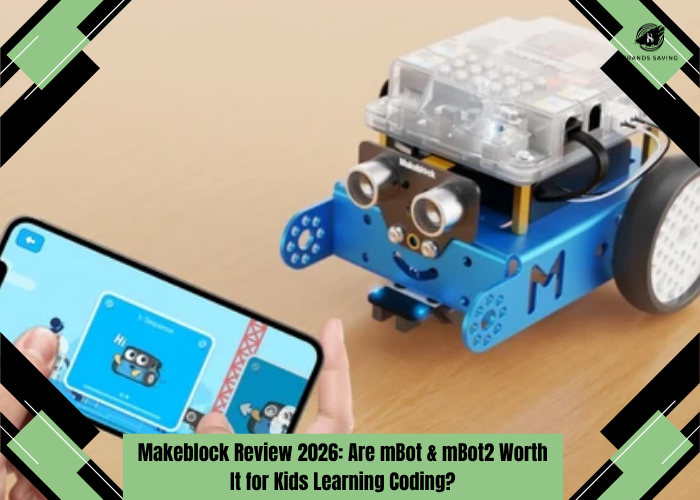
Makeblock Review 2026: Are mBot & mBot2 Worth It for Kids Learning Coding?
Quick Verdict
| Category | Our Take |
| Overall Rating | 9.1/10 |
| Best For | Kids and beginners who want hands-on coding and robotics |
| Best Value | Makeblock mBot |
| Best Overall | Makeblock mBot2 |
| Best Age Range | mBot: 6+; mBot2: roughly 8+ for independent learning |
| Coding | Block-based coding, Python on mBot2; Arduino options on other kits |
| mBot Price | $69.99 at time of review |
| mBot2 Regular Price | $149.99 |
| Biggest Strength | Excellent progression from playing to genuine programming |
| Biggest Weakness | Software setup/documentation can occasionally be less intuitive than the hardware |
Makeblock Review: A Real Coding Platform or Just Another STEM Toy?
There is no shortage of products promising to teach children coding. The problem is that many fall into one of two extremes. At one end are colorful toys that provide an hour or two of entertainment but don't offer much depth once a child understands the basic activities. At the other end are Arduino boards, Raspberry Pi projects and robotics components that offer enormous potential but can overwhelm a beginner before the first motor even turns. Makeblock's mBot family tries to occupy the space between those two worlds. A child gets the immediate satisfaction of building a physical robot, driving it around and making lights flash.
Then comes the more important part. Instead of stopping there, the same robot becomes something the child can program. Commands become sequences. Sequences become loops. Sensors introduce conditional logic. Eventually, on mBot2, visual blocks can give way to Python. That progression is the strongest argument for buying a Makeblock robot. Makeblock itself isn't a small newcomer. The company says it was founded in 2013 and its educational products are now used in more than 200,000 schools, with more than 30 million global users across over 210 countries.
So, is Makeblock worth it?
For the right learner, absolutely. The harder question is whether you should buy the inexpensive mBot, step up to mBot2, or choose something like LEGO Education SPIKE Prime instead. That's what this review will answer.
Check Today's Price
What Is Makeblock?
Makeblock is a STEM education company focused on robotics, coding, electronics and hands-on learning. The company was founded in 2013 with a mission centered around helping people turn ideas into reality and improving education through technology. It now works with more than 2,000 educational partners and says its products reach more than 200,000 schools. For home users, the mBot family is arguably its most recognizable product line.
The basic idea is simple: build a robot, control it, then program it.
Makeblock currently offers products ranging from beginner-friendly mBot through mBot2, mBot Ranger and the much more elaborate mBot Ultimate. The latter is a 10-in-1 building kit supporting Scratch and Arduino IDE and currently costs $399.99.
For this review, however, we're concentrating on the two products most parents are likely to consider: mBot and mBot2.
Makeblock mBot Review
The original mBot is still one of Makeblock's strongest products because it understands its audience. At the time of this review, Makeblock lists the standard mBot at $69.99, reduced from $88.99. It has 460 brand-hosted reviews. That's an appealing price for a functional programmable robot. More importantly, it doesn't require hours of assembly.
Makeblock says mBot can be put together in around 15 minutes, allowing children to get from opening the box to actually coding relatively quickly. That matters enormously with younger learners. A complicated build can be educational, but it can also consume all the enthusiasm before the coding begins. mBot gets to the reward quickly.
What Can mBot Actually Teach?
At first, children can simply control the robot and play with it. Then the programming layer becomes more important. Makeblock provides block-based coding tools so children don't need to understand Python or C syntax immediately. They can drag commands into sequences and visually understand what their program is doing.
That teaches concepts such as: sequencing, loops, conditions, variables, events and sensor-based behavior.
The key advantage is feedback. When a child writes ordinary beginner code on a laptop, the result might be a number appearing on the screen. With mBot, the robot actually moves. If the logic is wrong, the robot turns the wrong direction or fails to stop. Debugging suddenly becomes tangible. That can make abstract programming concepts considerably easier to understand.
Makeblock mBot2 Review
mBot2 is where Makeblock becomes much more than a beginner toy. Its normal list price is $149.99, although Makeblock was advertising a limited-time $94.99 price on its dedicated mBot2 page when we checked. Pricing and promotions can change, so buyers should verify the current offer before ordering. Makeblock positions mBot2 as a more sophisticated coding robot capable of supporting children as their programming abilities develop. The biggest upgrade is CyberPi.
CyberPi acts as the robot's programmable control center and opens up much more sophisticated projects. Makeblock says mBot2 can be programmed through its mBlock environment using block-based programming before learners progress to Python within the same platform. That transition is one of the main reasons we'd choose mBot2 for a child who already shows genuine interest in programming.
CyberPi Makes mBot2 Much More Capable
CyberPi changes the character of the robot. Instead of treating the robot as a fixed toy with a few programmable behaviors, it becomes a platform. Makeblock's learning examples include controlling LEDs, measuring light intensity, detecting sound levels, working with rotation angles, using buttons and joysticks, and even accessing the internet. The robot can therefore introduce several different STEM concepts without requiring a completely new kit.
Children can start with: “move forward.”
Then: “move forward until the sensor detects something.”
Eventually that becomes: “read environmental data, process it, make a decision and trigger an action.”
That's much closer to how real robotics works.
Block Coding to Python Is a Major Advantage
One of the biggest problems with beginner coding toys is the dead end. Children learn a proprietary visual system, become comfortable with it, and then discover that moving into real programming means starting over. mBot2 handles that transition better. The mBlock software lets students begin with block-based programming and then progress into Python. That doesn't mean a child will suddenly become a Python developer simply because they own mBot2.
But the progression makes sense. Visual programming teaches the logic. Python introduces the syntax. The underlying concepts—loops, variables, functions and conditions remain recognizable. For a child who already enjoys Scratch, mBot2 can therefore be a particularly good next step.
Sensors Turn Coding Into Robotics
Programming a robot becomes much more interesting when it can perceive its environment. mBot2 supports projects built around sensors and environmental input, including obstacle avoidance and line following. Makeblock also provides tutorials for these projects.
This introduces a fundamental robotics cycle: sense → process → act.
A sensor sees a line. The program interprets the reading. The motors adjust direction. A distance sensor detects an obstacle. The program evaluates the distance. The robot changes course. These are simple projects by professional robotics standards, but they're excellent educational exercises because children can immediately see why their logic matters.
AI and IoT Features Add Long-Term Depth
Makeblock also pushes mBot2 toward more advanced AI and connected projects. The company says mBlock can support activities involving image recognition, pose recognition and video recognition through machine-learning functionality. mBot2's CyberPi can also connect to the internet, opening up IoT-style projects. This is where mBot2 begins to justify its higher price. An eight-year-old doesn't need AI recognition on the first afternoon. But a robot that still offers interesting challenges two years later provides much better educational value than one that is mastered in a weekend.
Learning Resources: Better Than Most Robot Toys
Makeblock has invested substantially in educational material. Its mBot2 page currently advertises access to 200+ free lessons and cases, while the introductory curriculum covers movement, sensing, sound, ultrasonic sensing, navigation, networking and other activities.
The company also provides practical tutorials for projects such as: line-following robots, obstacle avoidance, internet-connected activities, LED control, and more advanced themed projects.
Makeblock says its broader educational curriculum aligns with standards including CSTA and NGSS. For schools, that's valuable. For parents, the more important benefit is simply having somewhere to go after completing the first basic experiment.
First Impressions: More Engineering Kit Than Toy
Makeblock's hardware has a different personality from LEGO. LEGO makes robotics feel like construction play. Makeblock makes it feel like you're building a machine. The metal chassis and visible electronics are part of the appeal. Instead of hiding the engineering, mBot puts motors, wires, sensors and structural components where children can see them. The original mBot is particularly approachable because the assembly takes roughly 15 minutes. mBot2 takes closer to 30 minutes according to Makeblock's dedicated product information.
That's a good balance. There's enough construction to create ownership— “I built this robot”— without turning the setup into a multi-hour engineering project.
Setup Experience: Hardware Excellent, Software Less Consistent
This is the biggest caveat in our Makeblock reviews research. The physical robot is easy to understand. The software ecosystem can occasionally be less intuitive. Recent mBot2 users have reported confusion around selecting CyberPi in the app and then adding the mBot2 Shield extension before all of the robot's programming blocks become available. One parent described the process as far less obvious than expected for a children's product. Other 2026 community reports have discussed iPadOS compatibility issues, firmware updates and difficulties connecting certain devices.
These are anecdotal reports rather than evidence that every customer will experience problems. But they reveal a genuine weakness. Makeblock's hardware feels beginner-friendly. Its software documentation doesn't always feel equally beginner-friendly. For parents with basic computer confidence, this is manageable. For someone expecting a completely plug-and-play toy, it may create frustration.
Real-World Learning Experience
The best thing about mBot isn't any individual feature. It's the learning loop.
- Build something.
- Predict what it will do.
- Write the program.
- Run it.
- Watch it fail.
- Change the program.
- Try again.
That cycle teaches far more than simply following an on-screen coding tutorial. A line-following project, for example, sounds simple until the robot starts missing tight corners. A 2026 mBot2 user competing in line racing reported inconsistent tracking at higher speeds. That's not necessarily a flaw it illustrates exactly the kind of real-world variables robotics introduces. Sensor readings, speed, surface contrast and programming decisions all affect the outcome.
This is why robotics can be more educational than screen-only coding. Real objects don't behave perfectly. Students have to troubleshoot.
Is mBot2 Too Difficult for an 8-Year-Old?
Not necessarily. But parental involvement matters. Makeblock positions mBot2 around beginner coding and its comparison material places the product in its younger STEM range, while more advanced products such as CyberPi and mBot Ultimate occupy higher levels. Community experiences suggest motivated children around eight can make meaningful progress. One parent in a 2025 robotics discussion said their younger child could independently complete block-coding courses on mBot2 but still needed help with more advanced routines and unfamiliar interfaces.
Another parent in August 2026 described an eight-year-old who already understood block coding and wanted to progress to Python, but the parent struggled to find a sufficiently clear learning path in Makeblock's materials. That feels realistic. An eight-year-old can use mBot2. An eight-year-old probably shouldn't be expected to troubleshoot Bluetooth, firmware and Python transitions completely alone.
mBot vs mBot2: Which Should You Buy?
| Feature | Makeblock mBot | Makeblock mBot2 |
| Regular Price | $88.99 | $149.99 |
| Price Seen During Review | $69.99 | $94.99 promotional / $149.99 regular |
| Best For | Beginners | Long-term STEM learning |
| Assembly | ~15 minutes | ~30 minutes |
| Programming | Block-based / progression | Block-based + Python |
| Controller | Simpler mCore platform | CyberPi |
| Sensors | Basic robotics | More advanced sensing |
| AI / IoT | Limited | Yes |
| Learning Curve | Easier | Moderate |
| Long-Term Potential | Good | Excellent |
| Best Age Profile | Younger beginners | 8+ motivated learners |
| Our Rating | 8.9/10 | 9.4/10 |
Current prices can change.
Choose mBot if...
Your child has never programmed before. At around $70 during our review, it's inexpensive enough to test whether robotics actually captures their interest. It also gets to the fun quickly. Build it, drive it and start coding.
Choose mBot2 if...
Your child already enjoys Scratch, coding games, electronics or building things. mBot2 has much more room to grow. The move from block coding to Python, CyberPi platform, networking and more sophisticated sensors makes the extra investment worthwhile for a committed learner. For most families who can afford the difference, mBot2 is our preferred purchase.
Makeblock Pricing & Value
Makeblock covers a surprisingly broad range.
| Product | Price at Review | Best For |
| mBot | $69.99 | First coding robot |
| mBot + Coding Box | $79.99 | Guided beginners |
| mBot2 | $94.99 promotional / $149.99 regular | Best overall |
| Codey Rocky | Around $139.99 | Interactive coding |
| mBot Ranger | $169.99 | Multi-form building |
| mBot Ultimate | $399.99 | Advanced robotics |
Prices are based on Makeblock's U.S. store when checked and may change. The original mBot is exceptionally competitive around $70. mBot2 is also excellent value when discounted near $95. At its normal $149.99 price, it requires more thought but still compares favorably with many education-focused robotics systems. Makeblock's U.S. site currently advertises free shipping above $39.99 and a one-year warranty.
Is the mBot2 Premium Worth It?
Usually, yes. The important distinction is that you're not paying primarily for a nicer toy. You're paying for learning headroom. A beginner may use 20% of mBot2's abilities during the first few weeks. That's fine. Six months later, the same robot can introduce Python. Later, sensors and networking become interesting. Eventually, optional components and more complex projects can extend it further. The longer a child remains interested, the better the value becomes. A $150 robot used for two years is a better purchase than a $60 coding toy that gets boring after two weekends.
Explore BRAND Collections
Makeblock Pros & Cons
| Pros | Cons |
| Excellent hands-on introduction to robotics | Software setup can occasionally be confusing |
| mBot is affordable | Some recent mobile/iPad compatibility complaints |
| mBot2 supports block coding and Python | Parents may need to help younger children |
| CyberPi gives mBot2 excellent long-term potential | Documentation isn't always as intuitive as LEGO |
| Real sensors teach practical programming | Advanced features require patience |
| Fast physical assembly | Original mBot has less long-term depth |
| Large educational resource library | Add-ons increase total investment |
| Used extensively in education | Not as construction-focused as LEGO |
| Expandable hardware ecosystem | Mobile experience can vary by platform |
| Strong value compared with classroom robotics kits | Best experience may require a laptop/desktop |
| Encourages troubleshooting and experimentation | Some projects have a steeper learning curve |
| One-year warranty | More advanced kits become expensive |
Who Should Buy Makeblock?
Makeblock is ideal for children who are interested in understanding how things work. A child who enjoys LEGO Technic, Scratch, electronics, science projects or dismantling gadgets is exactly the audience we'd have in mind. mBot is best for complete beginners. mBot2 is better for children who already show signs that coding might become a longer-term interest. Teachers, coding clubs and homeschool families are also particularly well served because Makeblock offers substantial lesson material rather than forcing adults to design every project from scratch.
| Buyer | Recommendation |
| First coding experience | mBot — Excellent |
| Ages 6–8 with parent help | mBot |
| Ages 8–12 interested in coding | mBot2 — Best Choice |
| Already uses Scratch | mBot2 |
| Wants to learn Python | mBot2 |
| Homeschool STEM | mBot2 |
| Classroom robotics | mBot2 / classroom packs |
| Wants maximum construction freedom | LEGO SPIKE may be better |
| Advanced teen maker | Arduino / Raspberry Pi / mBot Ultimate |
Who Should Avoid Makeblock?
Makeblock isn't ideal for every child. If the main attraction is building elaborate physical creations rather than programming, LEGO's ecosystem is stronger. mBot can be disassembled and expanded, but its central experience remains programming a robot rather than constructing limitless models from hundreds of pieces. Parents who want zero technical involvement should also think carefully about mBot2.
The robot itself is beginner-friendly, but Bluetooth connections, firmware updates, software extensions and Python projects can require adult troubleshooting. And if your teenager is already comfortable building circuits and writing Python or C++, mBot may actually be too restrictive. At that stage, an Arduino or Raspberry Pi robotics project could provide considerably more freedom.
Makeblock Reviews: What Customers and Parents Say
Makeblock's official mBot page currently shows 460 brand-hosted reviews, which is a useful volume of product feedback, though it should not be treated as independent evidence. The broader independent picture is generally positive about the hardware. Parents and teachers frequently like the combination of physical building, block coding and extensibility. One recent robotics recommendation described mBot2 as a strong learning platform with enough built-in sensors to get started and said the child could work through block-coding material largely independently. A teacher discussing mBot2 in schools in 2026 similarly described students enjoying the robots enough to give them names and praised the availability of extensions and learning resources.
The criticism is remarkably consistent, though: software and instructions.
Recent users have reported problems getting Android apps working correctly, confusion around adding mBot2 controls, iPadOS compatibility problems and firmware-related troubleshooting. That leads to a balanced conclusion. The robot is the strong part of the ecosystem. The software experience is the part Makeblock still needs to make more consistently frictionless.
Is Makeblock Legit?
Yes. Makeblock is a long-established STEM education company rather than a generic toy reseller. The company says it has more than 30 million users, works with 2,000+ educational partners, appears in 200,000+ schools, and reaches more than 210 countries. Makeblock also provides education-focused curricula and says its resources include CSTA- and NGSS-aligned material. Its longevity, large installed base, school presence and extensive hardware/software ecosystem make legitimacy a non-issue. The real debate is how it compares with LEGO.
Makeblock vs LEGO SPIKE Prime
This comparison changed significantly in 2026. LEGO Education announced that the SPIKE portfolio, including SPIKE Essential and SPIKE Prime, is being retired. LEGO says the SPIKE App will continue receiving support through June 30, 2031, so existing kits aren't suddenly obsolete—but buyers should understand that they're purchasing into a retiring hardware portfolio.
SPIKE Prime remains an excellent educational system. It contains 528 LEGO elements, targets roughly ages 10+ / grades 6–8 and supports Scratch-based word blocks plus Python.
| Feature | Makeblock mBot2 | LEGO SPIKE Prime |
| Primary Focus | Robotics & coding | Building + robotics |
| Typical Age | ~8+ | 10+ |
| Coding | Blocks + Python | Blocks + Python |
| Main Hardware | CyberPi robot platform | LEGO programmable hub |
| Construction | Moderate | Excellent |
| Sensors | Strong | Strong |
| AI / IoT | Strong focus | Less central |
| Coding Progression | Excellent | Excellent |
| Classroom Resources | Excellent | Excellent |
| Physical Creativity | Good | Outstanding |
| Entry Cost | Lower | Historically much higher |
| Hardware Future | Active mBot ecosystem | SPIKE portfolio retiring |
| Best For | Coding-first robotics | Construction-first STEAM |
Makeblock wins on robotics value
mBot2 is a more focused robot. You build it and quickly begin experimenting with movement, sensors and programming. It costs much less than SPIKE Prime historically did, making it easier to recommend for home use.
LEGO wins on building creativity
SPIKE Prime contains hundreds of LEGO elements. Children can create radically different physical mechanisms rather than mostly modifying one robot platform. If mechanical design and construction are as important as programming, LEGO's approach remains exceptional.
But SPIKE Prime's retirement matters
This doesn't suddenly make SPIKE Prime bad. LEGO has committed to software support through 2031. However, someone buying a new STEM platform in late 2026 should consider the product's future. That gives Makeblock an additional advantage for new buyers.
Makeblock vs LEGO Mindstorms
LEGO Mindstorms deserves mention because many parents still search Makeblock vs LEGO Mindstorms. Mindstorms was historically one of the benchmarks for consumer educational robotics, combining LEGO Technic construction with programmable motors and sensors. But LEGO discontinued the consumer Mindstorms line years ago. That makes mBot2 the more practical recommendation for someone buying a new, actively marketed coding robot today. Used Mindstorms kits remain interesting for enthusiasts, but we'd hesitate to build a new child's learning journey around discontinued hardware unless the family already owns the ecosystem.
Makeblock vs Arduino
Arduino wins on freedom. Makeblock wins on accessibility. With Arduino, almost anything is possible if you understand electronics and programming. That's also the problem.
A beginner has to think about: boards, motor drivers, power, sensors, wiring, mechanical construction, libraries, and code.
mBot packages those pieces into a controlled learning environment. For a nine-year-old, that's usually the right compromise. For a technically advanced 15-year-old, Arduino may be more rewarding.
Best Coding Robot for Kids: Where Does Makeblock Rank?
For 2026, mBot2 remains one of our strongest choices for a coding-first educational robot. Its advantage isn't flashy AI marketing. It's progression.
A child can: build it, drive it, program movement, use sensors, solve physical challenges, learn block coding, move into Python, and eventually explore networking and more advanced robotics.
That is a legitimate educational path rather than a collection of unrelated games. The biggest thing holding Makeblock back from an even higher score is software polish. If the mobile experience and documentation were as intuitive as the physical robot, this would be exceptionally difficult to criticize.
Frequently Asked Questions
Is Makeblock worth it?
Yes. Makeblock is particularly good value for children interested in coding and robotics. mBot offers an affordable introduction, while mBot2 provides considerably more long-term learning potential through CyberPi, sensors and Python support.
Is Makeblock legit?
Yes. Makeblock was founded in 2013 and says its education products are used in more than 200,000 schools across over 210 countries.
Is mBot good for beginners?
Yes. Makeblock says mBot can be assembled in about 15 minutes and is designed specifically to introduce beginners to electronics, robotics and programming.
What age is Makeblock mBot for?
Makeblock positions mBot within its younger coding range, and its current store describes it as suitable for ages 6+. Younger children will generally benefit from adult help during setup and early coding activities.
What age is mBot2 for?
mBot2 is a good practical fit for many learners around eight and older, particularly children who already understand basic block coding. Younger users may require more parental assistance with software and troubleshooting.
Can mBot2 teach Python?
Yes. Makeblock's mBlock software allows students to begin with block-based programming and progress into Python within the same platform.
What is the difference between mBot and mBot2?
mBot is a simpler and cheaper introductory robot. mBot2 adds CyberPi, more advanced sensing, more precise robotics features, networking capabilities and a stronger pathway into Python and advanced STEM projects.
Is mBot2 better than LEGO SPIKE Prime?
mBot2 is better value for buyers primarily interested in coding and robotics. SPIKE Prime offers substantially more physical construction freedom through LEGO elements, but LEGO announced in 2026 that the SPIKE portfolio is being retired, with app support continuing through June 2031.
Is Makeblock better than LEGO Mindstorms?
For someone buying a new coding robot in 2026, Makeblock is easier to recommend because mBot remains an actively marketed ecosystem, while LEGO's consumer Mindstorms line has been discontinued.
Does mBot2 work without coding?
Yes. mBot2 can be controlled through Makeblock's software/controller options, but coding is where most of its educational value comes from.
Can schools use Makeblock?
Yes. Makeblock offers classroom packs, standards-aligned curriculum and education resources. The company says its solutions are already used in more than 200,000 schools.
Does Makeblock have learning materials?
Yes. Makeblock currently advertises hundreds of free lessons and cases around mBot2, alongside beginner courses, tutorials and classroom materials.
Final Verdict: Is Makeblock Worth It in 2026?
Makeblock succeeds because it understands that the best educational robot needs to be two things at once. Fun enough to make a child want to start.
And: deep enough to make learning continue after the novelty disappears. The original mBot handles the first requirement exceptionally well.
At roughly $70 when we checked, it's one of the easiest ways to find out whether a child actually enjoys robotics. Assembly is quick, block programming is approachable and the physical feedback makes coding concepts tangible.mBot2 handles the second requirement. CyberPi, richer sensors, internet connectivity, block coding, Python and a growing collection of projects give it substantially more headroom. That's why we'd spend more on mBot2 for a child who already enjoys Scratch or shows a strong interest in STEM.
The hardware isn't the problem. Software polish is. Recent user reports involving app compatibility, firmware and confusing setup steps prevent us from treating mBot2 as completely frictionless. Parents should expect to help occasionally. But that weakness doesn't outweigh what Makeblock gets right.
Shop BRAND Now
At BrandsSaving, we are dedicated to helping you shop more intelligently, spend more judiciously, and find superior value online. Regardless of whether you are a student, a parent, a fashion enthusiast, or just a sensible shopper, we link you to dependable savings opportunities and trustworthy buying options from your preferred brands across the globe
Subscribe
Sign up below to receive money-saving tips, frugal ideas, family-friendly recipes, and more.