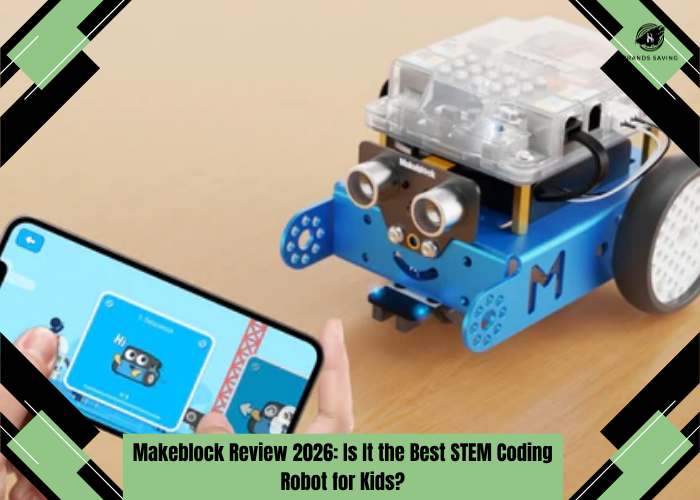
Makeblock Review 2026: Is It the Best STEM Coding Robot for Kids?
Quick Verdict
| Overall Rating | 9.4 / 10 |
| Best For | Kids aged 8+, beginners, schools, STEM education |
| Category | Educational Coding Robot |
| Programming | Scratch, Python, AI, Robotics |
Makeblock Review
Teaching children how to code has become far more important than it was just a decade ago. Programming, computational thinking, and robotics are no longer niche skills reserved for computer scientists they're becoming essential tools for future careers in technology, engineering, and even creative industries. The challenge, however, is finding a platform that makes learning enjoyable rather than overwhelming. That's exactly where Makeblock has built its reputation. Known for educational robots like the mBot and mBot2, Makeblock combines hands-on construction with interactive coding lessons to help children develop practical STEM skills through play.
But with strong competition from LEGO Education and other robotics kits, many parents and teachers wonder: Is Makeblock really worth buying?
In this in-depth Makeblock Review, we'll examine the company's most popular robotics kits, explore how well they teach coding, evaluate build quality, discuss pricing, compare Makeblock with LEGO SPIKE Prime and LEGO Mindstorms, and help you decide whether it's the right STEM investment. By the end of this review, you'll have a clear understanding of who should choose Makeblock and who might be better served by another robotics platform.
Check Today's Price
What Is Makeblock?
Makeblock is an educational technology company specializing in robotics, coding, artificial intelligence, and STEM learning solutions. Founded with the goal of making technology education more accessible, the company develops hardware and software that allow children to learn programming through interactive projects instead of traditional textbooks.
Its products are widely used in:
- Homes
- Schools
- Coding clubs
- Robotics competitions
- Makerspaces
- Educational programs worldwide
Rather than simply teaching programming syntax, Makeblock encourages students to design, build, test, and improve their own robotic creations. This practical approach helps learners understand how software and hardware work together to solve real-world problems.
Who Is Makeblock Designed For?
One of Makeblock's biggest strengths is its flexibility. The platform can be adapted for different ages and skill levels, making it suitable for both beginners and more experienced young programmers.
It works particularly well for:
- Children learning to code for the first time
- Parents who want educational STEM toys
- Teachers introducing robotics in the classroom
- Schools building coding curricula
- Robotics clubs
- Homeschooling families
- Young makers interested in engineering
Because the learning path gradually progresses from visual coding to text-based programming, students can continue using Makeblock as their skills develop.
Key Features
Visual Programming with Scratch
The easiest way to begin coding is through visual programming. Instead of writing complicated lines of code, students drag and connect colorful programming blocks. This makes it much easier to understand concepts like:
- Loops
- Variables
- Conditions
- Events
- Functions
- Sensors
The transition from visual logic to programming becomes much less intimidating. For younger learners, this significantly reduces frustration while keeping lessons engaging.
Python Programming Support
As students become more confident, Makeblock allows them to move beyond Scratch and begin writing real Python code. This progression is one of the platform's greatest strengths. Rather than forcing learners to switch to a completely different system later, Makeblock grows alongside their abilities. Python is widely used in software development, data science, automation, and artificial intelligence, making it an excellent language for long-term learning.
Modular Robotics System
Unlike many educational toys that offer limited possibilities, Makeblock products encourage experimentation. Students can assemble robots, modify components, add sensors, and test different configurations. This hands-on process teaches much more than programming alone.
It also develops:
- Engineering thinking
- Problem-solving
- Creativity
- Logical reasoning
- Mechanical understanding
Every project encourages students to think critically and improve their designs through trial and error.
AI and Smart Technology
Newer products such as the mBot2 introduce students to technologies that are becoming increasingly relevant in today's world. Depending on the kit, learners can explore concepts such as:
- Artificial Intelligence
- Internet of Things (IoT)
- Smart sensors
- Voice interaction
- Line following
- Obstacle avoidance
- Autonomous movement
Rather than simply reading about these technologies, students interact with them directly. This practical experience often creates a deeper understanding than classroom theory alone.
Durable Hardware
Educational robots inevitably experience bumps, drops, and repeated assembly. Fortunately, Makeblock's hardware feels well-designed for regular use. The metal components, quality electronics, and secure connectors provide confidence that the kits can withstand years of classroom or home learning. Replacement parts and expansion modules are also readily available, making long-term ownership more practical than many cheaper alternatives.
First Impressions
From the moment you open a Makeblock kit, it's clear that education not just entertainment has been the primary focus.The packaging is neatly organised, with components arranged logically to simplify the building process. Each part is clearly labelled, and the instruction manual is well illustrated, making assembly approachable even for first-time users. The quality of the materials stands out immediately. Metal structural pieces, durable plastic components, and neatly packaged electronics give the impression of a product designed for repeated use rather than a one-time project. Setting up the companion software is straightforward. The Makeblock app and mBlock programming platform guide users through the initial connection process, allowing children to begin experimenting with coding shortly after construction is complete.
Perhaps the most impressive first impression is how quickly the kit transforms from a box of parts into a functioning robot. Watching the first programmed movement or successfully completing a simple coding task creates an immediate sense of accomplishment that keeps learners motivated to explore further. Rather than feeling like a toy that happens to include coding, Makeblock comes across as a genuine educational platform designed to make robotics approachable, engaging, and rewarding for learners of all ages.
Performance & Real-World Experience
The real value of a STEM robotics kit isn't determined by how impressive it looks on the box it's measured by how effectively it keeps children engaged while teaching practical skills. After evaluating Makeblock's ecosystem, one thing becomes clear: its greatest strength is balancing education with enjoyment. Unlike many coding toys that become repetitive after a few projects, Makeblock encourages experimentation. Each lesson naturally leads to another challenge, allowing students to build confidence while developing increasingly advanced programming skills. Whether controlling motors, programming sensors, or designing autonomous robot movements, the learning experience feels interactive rather than instructional. This project-based approach helps children understand why code matters instead of simply memorizing commands.
Ease of Learning
One of Makeblock's biggest advantages is its structured learning progression. Beginners can start with simple drag-and-drop coding using Scratch blocks. Once they understand programming logic, they can gradually transition to Python without changing platforms. This removes one of the biggest frustrations found in many coding products having to start over with completely new software. Children gain confidence because every new lesson builds on previous knowledge.
Educational Value
Makeblock teaches much more than coding. During projects, students naturally develop:
- Logical thinking
- Engineering concepts
- Problem-solving
- Creativity
- Mathematics
- Computational thinking
- Teamwork (in classrooms)
This multidisciplinary approach is why Makeblock is widely adopted in schools and robotics clubs around the world. Rather than focusing solely on programming syntax, students learn how technology works as an integrated system.
Classroom Performance
Teachers often need educational tools that work reliably with multiple students. Makeblock performs well in this environment thanks to:
- Structured lesson plans
- Stable software
- Durable hardware
- Expandable projects
- Collaborative activities
The platform also supports classroom management features, making it easier for educators to guide multiple learners simultaneously.
Home Learning Experience
Parents appreciate that Makeblock doesn't require extensive technical knowledge. Most kits include step-by-step instructions that allow families to build robots together. This collaborative experience often becomes one of the product's biggest strengths. Instead of simply giving children screen time, Makeblock creates opportunities for shared learning between parents and children.
Software Experience
The mBlock software is one of Makeblock's strongest assets. Its clean interface keeps coding approachable without sacrificing functionality. As learners become more experienced, the software unlocks additional programming capabilities including:
- Python
- AI applications
- Data visualization
- Robotics control
- Sensor programming
The transition feels natural rather than overwhelming.
mBot Review
The original mBot remains one of Makeblock's most popular educational robots. Designed primarily for beginners, it introduces children to robotics through simple assembly and visual programming. Setup usually takes less than an hour, making it accessible even for families with no robotics experience. Once assembled, children can immediately begin experimenting with:
- Movement
- Lights
- Sounds
- Line following
- Obstacle avoidance
- Remote control
The gradual learning curve keeps younger learners engaged while introducing increasingly advanced programming concepts.
What We Liked
The mBot is incredibly approachable. Its assembly process is simple, coding lessons are beginner-friendly, and the robot responds quickly to programming changes. Children experience immediate feedback, making learning both rewarding and enjoyable. The durable construction also makes it suitable for repeated classroom use.
Areas for Improvement
As children gain experience, they may eventually outgrow some of the robot's simpler capabilities.
Fortunately, Makeblock offers more advanced robots for continued learning.
mBot2 Review
The mBot2 represents a significant upgrade over the original. Rather than simply improving hardware, Makeblock has expanded the educational possibilities. The robot introduces more advanced technologies including:
- Artificial Intelligence
- Internet of Things
- Advanced sensors
- Better processing power
- Improved expansion capabilities
These additions make the mBot2 suitable not only for beginners but also for intermediate learners who want to explore modern robotics concepts. Programming remains accessible through Scratch before gradually introducing Python. This dual-learning approach allows students to progress naturally without feeling overwhelmed.
Real-World Projects
One area where the mBot2 excels is project variety. Students can build robots capable of:
- Autonomous navigation
- Smart obstacle avoidance
- AI-based interactions
- Sensor-driven automation
- Remote control
- Smart city simulations
These projects feel meaningful because they resemble technologies used in modern engineering rather than simple classroom exercises.
Pricing & Value Analysis
Makeblock products cover a fairly broad price range. Entry-level kits like the original mBot are accessible for families looking to introduce children to coding without making a major investment. More advanced systems, including the mBot2 and classroom bundles, naturally cost more because they include additional hardware, sensors, and learning capabilities. While Makeblock isn't the cheapest robotics platform available, it offers strong long-term value.
Unlike many STEM toys that lose their appeal after a few weeks, Makeblock's expandable ecosystem allows students to continue learning as their skills grow. This means families often purchase one platform rather than replacing products every year. For schools, the value becomes even greater. The combination of lesson plans, durable hardware, and scalable curriculum helps justify the higher upfront investment.
Is Makeblock Worth It?
For most families and educators, the answer is yes. If your goal is simply buying another electronic toy, Makeblock may feel expensive. However, if you're investing in long-term STEM education, robotics, and computational thinking, the platform offers excellent value. Its ability to grow alongside students makes it a much stronger educational investment than many competing products aimed only at beginners.
Explore BRAND Collections
Pros & Cons
| Pros | Cons |
| Outstanding STEM education platform | Higher price than basic coding toys |
| Scratch and Python support | Advanced kits require more time to master |
| Excellent build quality | Some accessories sold separately |
| Strong classroom integration | Younger children may need supervision |
| Expandable robotics ecosystem | Premium classroom bundles can be costly |
| Engaging project-based learning | Initial setup takes time for first-time users |
Who Should Buy Makeblock?
Makeblock is an excellent choice for parents who want to encourage curiosity in science, engineering, and technology from an early age. It is equally well suited to teachers looking for a structured robotics platform that aligns with STEM learning objectives. Children interested in building, experimenting, and solving problems will get the most value from the platform. Because learners can progress from Scratch to Python, Makeblock remains useful long after the initial projects are completed.
Recommendation
| User | Recommendation |
| Kids (8+) | ⭐⭐⭐⭐⭐ |
| Parents | ⭐⭐⭐⭐⭐ |
| Schools | ⭐⭐⭐⭐⭐ |
| Coding Clubs | ⭐⭐⭐⭐⭐ |
| Homeschooling | ⭐⭐⭐⭐⭐ |
| Advanced Robotics Enthusiasts | ⭐⭐⭐⭐☆ |
Who Should Avoid Makeblock?
Makeblock may not be the best choice for families looking for a simple plug-and-play toy with instant entertainment. Children who have little interest in building or programming may lose interest if they are not encouraged through projects. Likewise, advanced robotics enthusiasts seeking fully open-source hardware or highly specialized engineering platforms may eventually outgrow Makeblock's educational focus. For its intended audience students, parents, and educators it remains one of the most complete STEM learning ecosystems available.
Customer Feedback Summary
Feedback from parents, teachers, and students consistently highlights Makeblock's engaging learning experience and high educational value. Users frequently praise the quality of the hardware, the intuitive mBlock software, and the ability to progress from beginner-friendly block coding to Python. Many educators appreciate the structured curriculum and classroom resources, while parents often mention that building and programming robots together becomes an enjoyable family activity.
Constructive criticism generally focuses on the price of advanced kits and expansion packs, as well as the time required to complete more complex projects. However, these points are usually viewed as part of the platform's educational depth rather than significant drawbacks. Overall, Makeblock earns a strong reputation as a reliable, well-supported robotics platform that successfully combines creativity, coding, and hands-on STEM learning.
Makeblock vs LEGO SPIKE Prime
When comparing educational robotics platforms, Makeblock and LEGO SPIKE Prime are two of the strongest options available. Both are designed to teach coding, engineering, and computational thinking, but they target slightly different audiences. LEGO SPIKE Prime excels in classroom environments with its familiar LEGO building system, structured lesson plans, and widespread adoption in schools. It encourages collaborative learning and introduces programming concepts through Scratch-based coding.
Makeblock, however, offers a more engineering-focused experience. Its metal components, modular electronics, and transition from Scratch to Python create a learning path that extends beyond basic robotics. Students interested in AI, IoT, and advanced automation often have more room to grow within the Makeblock ecosystem. Another advantage of Makeblock is its hardware flexibility. Instead of relying primarily on LEGO bricks, learners work with motors, sensors, metal frames, and electronic modules that more closely resemble real-world robotics systems.
Which Should You Buy?
- Choose Makeblock if your child wants to explore robotics, programming, AI, and engineering beyond beginner projects.
- Choose LEGO SPIKE Prime if you prefer the LEGO building experience and need a structured classroom-focused curriculum.
Makeblock vs LEGO Mindstorms
Although LEGO Mindstorms has long been one of the most recognizable names in educational robotics, its product line has been discontinued in favor of newer LEGO Education platforms. For families comparing older Mindstorms kits with Makeblock, several differences stand out. Makeblock offers a more modern ecosystem with active software development, ongoing hardware support, and a clearer progression from beginner coding to advanced programming. Mindstorms remains an excellent robotics platform for those who already own it, particularly because of its creative LEGO-based building possibilities. However, new buyers will generally receive better long-term support, updated educational resources, and expanding AI capabilities with Makeblock.
Competitor Comparison
| Feature | Makeblock | LEGO SPIKE Prime | LEGO Mindstorms |
| Beginner Friendly | ⭐⭐⭐⭐⭐ | ⭐⭐⭐⭐⭐ | ⭐⭐⭐⭐☆ |
| Scratch Coding | ⭐⭐⭐⭐⭐ | ⭐⭐⭐⭐⭐ | ⭐⭐⭐⭐⭐ |
| Python Support | ⭐⭐⭐⭐⭐ | ⭐⭐⭐⭐☆ | ⭐⭐⭐⭐☆ |
| Robotics Expansion | ⭐⭐⭐⭐⭐ | ⭐⭐⭐⭐☆ | ⭐⭐⭐⭐⭐ |
| AI & IoT Learning | ⭐⭐⭐⭐⭐ | ⭐⭐⭐⭐☆ | ⭐⭐⭐☆☆ |
| Classroom Resources | ⭐⭐⭐⭐☆ | ⭐⭐⭐⭐⭐ | ⭐⭐⭐⭐☆ |
| Build Quality | ⭐⭐⭐⭐⭐ | ⭐⭐⭐⭐⭐ | ⭐⭐⭐⭐⭐ |
| Value for Money | ⭐⭐⭐⭐⭐ | ⭐⭐⭐⭐☆ | ⭐⭐⭐☆☆ |
Overall Recommendation
- Best Overall STEM Platform: Makeblock
- Best Classroom Curriculum: LEGO SPIKE Prime
- Best Creative LEGO Robotics (Legacy): LEGO Mindstorms
Frequently Asked Questions
1. Is Makeblock worth buying?
Yes. Makeblock is one of the best educational robotics platforms for learning coding, engineering, and STEM concepts. Its combination of hands-on building and progressive programming makes it an excellent long-term investment.
2. What age is Makeblock suitable for?
Most Makeblock products are recommended for children aged 8 years and older, although some younger learners can participate with adult guidance.
3. Is mBot good for beginners?
Absolutely. The original mBot is specifically designed to introduce coding and robotics through simple assembly and visual programming.
4. Is mBot2 better than mBot?
Yes. The mBot2 offers improved hardware, additional sensors, AI capabilities, and a more advanced learning experience while remaining beginner-friendly.
5. Does Makeblock teach real programming?
Yes. Students typically begin with Scratch-based block coding before progressing to Python, providing a strong foundation for future programming.
6. Is Makeblock better than LEGO SPIKE Prime?
Both are excellent choices. Makeblock offers greater flexibility and a stronger engineering focus, while LEGO SPIKE Prime excels with its classroom curriculum and familiar LEGO building system.
7. Can Makeblock be used in schools?
Yes. Many schools, coding academies, and robotics clubs use Makeblock thanks to its curriculum resources, classroom support, and scalable learning ecosystem.
8. Does Makeblock require prior coding experience?
No. Beginners can start with visual programming and gradually progress to text-based coding as their confidence grows.
9. Is Makeblock suitable for homeschooling?
Yes. Its structured lessons, project-based learning, and flexible progression make it an excellent option for homeschooling families.
10. Are Makeblock discount codes available?
Makeblock occasionally offers seasonal promotions, educational discounts, and special offers through its official website and selected retailers.
Final Verdict
After reviewing Makeblock's hardware, software, educational ecosystem, and overall value, it's clear why the brand has become a trusted name in STEM education. Unlike many coding toys that provide only short-term entertainment, Makeblock is designed as a complete learning platform. It encourages children to think critically, solve problems, and understand how programming and engineering work together in practical applications. The progression from Scratch to Python, combined with durable hardware and an expanding robotics ecosystem, ensures that learners continue to benefit as their skills grow.
Although advanced kits require a larger investment than basic coding toys, the educational value justifies the price for families, schools, and educators committed to long-term STEM learning. If you're searching for one of the best coding robot kits for kids or a comprehensive STEM robotics platform, Makeblock remains one of the strongest recommendations in 2026.
Shop BRAND Now
At BrandsSaving, we are dedicated to helping you shop more intelligently, spend more judiciously, and find superior value online. Regardless of whether you are a student, a parent, a fashion enthusiast, or just a sensible shopper, we link you to dependable savings opportunities and trustworthy buying options from your preferred brands across the globe
Subscribe
Sign up below to receive money-saving tips, frugal ideas, family-friendly recipes, and more.