
Memoryboard Review: Is Its Dementia Clock Worth Buying?
Introduction: A Message That Does Not Disappear Into a Phone
A text saying “I’ll visit at three” is useful only if the recipient finds it, reads it, and can return to it when needed. For families supporting someone with memory difficulties, that simple sequence can become unreliable. Messages disappear among notifications, phones go missing, and yesterday’s plans can become mixed up with today’s.
This Memoryboard review examines a dedicated display designed to make reminders and family messages easier to see. The idea is appealing: caregivers manage the information remotely, while their loved one reads it without navigating an app.
But does that justify buying another screen? Should you choose the smaller or larger model? And where does a reminder board help and where should expectations remain modest?
Those are the questions that matter more than an impressive feature list.
Check Today's Price
What Is Memoryboard?
Memoryboard is a connected digital display for messages, reminders, photos, and time-related information. Family members manage its content through a companion app. The company presents its origins as a response to memory loss within its own family. Its website identifies MemoryBoard Inc. and co-founder Tyler Zanini. That background explains the caregiver-focused design, although a personal founding story is not evidence of clinical effectiveness.
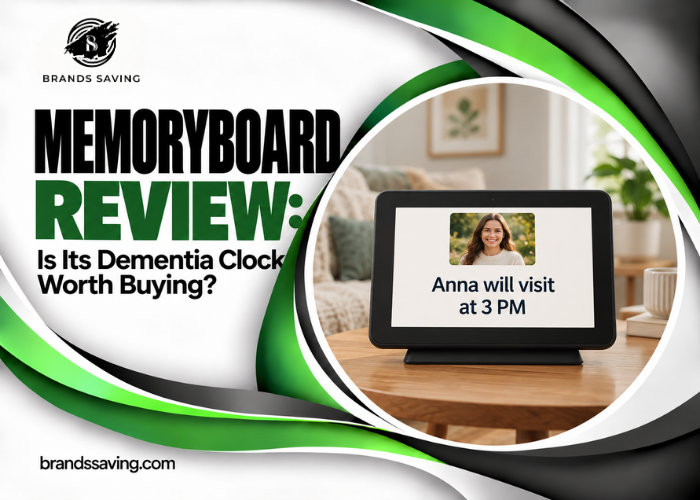
The product sits between a conventional day clock and a remotely managed message board. A standard clock answers “What time is it?” Memoryboard’s more distinctive purpose is displaying information such as “Anna is visiting after lunch.” Its target audience includes families supporting older relatives and people with memory difficulties. The recipient’s actual abilities matter more than an age or diagnostic label.
Key Features: What Makes Memoryboard Different?
Remote Messages and Photos
The central benefit is changing what appears on the display without being physically present. A caregiver can update a visit time, add a reassuring note, or share a family photograph. This is more flexible than a paper note that remains unchanged until someone returns. Memoryboard’s published operating description also includes shared access through a Care Circle, allowing family members and caregivers to contribute. The recipient does not need to tap or navigate to view incoming content. Shared access is useful, but families need a common approach. If several people send different instructions, the screen can become another source of confusion. Agree on who maintains important reminders and how changes will be communicated.
Scheduled Reminders
Scheduling makes a message relevant to a particular part of the day. A practical example is a prompt about an upcoming visit rather than leaving the same note visible indefinitely. The usefulness comes from timing and wording, not simply from having more reminders. A concise message is easier to interpret than a paragraph containing several tasks. Before relying on a recurring schedule, check how it behaves on the current software version. Confirm the start time, repeat settings, and expiry behavior with a nonessential test message. A reminder appearing on screen does not establish that the recipient noticed it or completed the task.
A Display the Recipient Can Simply Read
The passive viewing approach addresses an important barrier: a person may benefit from information while finding menus and notifications frustrating.
However, passive does not mean universally accessible. Reading ability, attention, vision, and interpretation all affect the result. Try familiar wording. “David will visit after lunch” may be more useful than a formal calendar entry containing an address and several abbreviations. Alzheimer’s Society recognizes clocks, calendars, and reminder tools as possible memory aids, while emphasizing individual needs and available help with setup. That supports evaluating this category of product, not assuming this particular device works for everyone.
Power, Connectivity, and Placement
Manufacturer specifications list IPS touchscreens, a built-in speaker, iOS and Android compatibility, a supplied stand, and continuous plug-in operation. New messages and photos require 2.4 GHz Wi-Fi; a 5 GHz-only network is unsuitable. Wall mounting is possible, but mounting hardware is not included.
These requirements should influence the buying decision early. Choose a location with a convenient outlet and dependable coverage. For a facility, ask whether its network allows the device to connect; do not assume access works like home Wi-Fi. A display placed where the person naturally looks is more useful than one positioned wherever an outlet happens to be available.
Memoryboard 10.1 Review: The Smaller-Space Choice
The smaller model makes the most sense when the person will view it nearby. For this Memoryboard 10.1 review, the main question is whether its placement encourages regular use. A bedside table, familiar kitchen area, or desk may offer a natural viewing location. Its appeal is a less prominent physical presence and a lower purchase price. It can fit into an established room arrangement without becoming the dominant object. That does not mean it is the right choice merely because it costs less. If the person mainly sits across the room, a smaller display may undermine the reason for buying it. Think about where the recipient spends time, not where you would prefer to place a new gadget.
Memoryboard 15.6 Review: When Visibility Matters More
The larger model is worth considering for a main living space or more distant viewing. A useful Memoryboard 15.6 review should not equate size with guaranteed readability. Glare, message length, viewing angle, and individual vision still matter. The additional space can make the screen more noticeable, but its physical presence may be unwelcome in a small bedroom or crowded room.
The manufacturer says both sizes share the same features and app. The larger purchase is therefore primarily a placement and visibility decision rather than an upgrade to a different caregiving system. If possible, mark out the proposed location before ordering. Evaluate it from the chair or bed where the person normally sits.
First Impressions and Setup: What to Expect
We cannot assess packaging quality, build feel, or touchscreen responsiveness without handling a purchased unit. The documented setup process is straightforward in outline: connect the board, select the destination’s time zone, install the app, and pair the account using the displayed code. If you prepare it elsewhere, reconnect it to the recipient’s network after moving it. Allow time for more than account creation. Placement, brightness, message wording, and introducing the screen to its user are part of a successful setup.
Begin with one familiar message and a recognizable photo. Explain what the board is for, then observe whether the person returns to it naturally. Keep the instructions and purchasing information accessible. A relative or staff member may need to help if connectivity changes. The best initial experience is a clear, familiar screen—not a fully populated schedule on the first afternoon.
Memoryboard Dementia Clock Review: Practical Benefits and Limits
Where It May Be Helpful
Memoryboard’s strongest use case is making information available for someone who can still understand written prompts but does not reliably use a phone. A message about who is visiting can remain easier to find than a text hidden among notifications. Photos may also make the display feel personal rather than purely instructional. The realistic goal is supporting an existing routine. It is not reasonable to promise fewer symptoms, restored memory, or a particular reduction in caregiver workload.
Judge success through the person’s response: do they look at it, understand it, and find it reassuring?
Where It May Fall Short
Some people may not notice a screen or may have difficulty connecting a written instruction with an action. Others may find repeated prompts irritating. A date that helps one person orient themselves could upset another. If the display produces distress, simplify the content or reconsider its use. An occupational therapist or another professional familiar with the person can help evaluate suitable aids. Alzheimer’s Society describes assistive technology as a possible support for everyday activities, with privacy and independence remaining important considerations.
Medication Reminders Need Separate Safeguards
A message about medication is not evidence that medication was taken correctly. Do not treat the board as a dispensing system, adherence monitor, or replacement for supervision. Where medication safety is a concern, maintain the person’s established care arrangements. Memoryboard’s own response in a caregiver discussion acknowledges that it should not be the only medication-safety system. The useful distinction is between communicating a prompt and verifying an outcome.
Memoryboard Digital Calendar Review: Clarify What You Need
The phrase “digital calendar” can describe very different products. Someone may want a large monthly planner, automatic synchronization with an existing calendar, or a simple display telling them what happens next. This Memoryboard digital calendar review evaluates its documented reminder and messaging functions. It does not assume Google Calendar or Outlook synchronization, a particular monthly layout, or any integration not verified in the research.
If a specific calendar workflow is essential, ask support to demonstrate it before buying. For many households, a short prompt may be more suitable than showing a busy week of appointments. For others, a conventional planner may better match their existing habits. Buy for the information the person can use, rather than for the broad “digital calendar” label.
Pricing and Value: Is the Premium Justified?
The researched U.S. storefront displayed the following prices:
| Model | Listed price | Main buying consideration |
| Memoryboard 10.1-inch | $175 | Nearby viewing and smaller spaces |
| Memoryboard 15.6-inch | $275 | Larger display for the intended location |
The store states that functionality is included without a required monthly subscription. It also advertises BUNDLE10 for 10% off purchases of two or more boards. Verify eligibility and the final total at checkout. The extra $100 for the larger model is justified only if visibility or placement makes it more useful. Compared with an ordinary clock, the premium buys a remotely managed communication system. If all you need is the day and date, much of that functionality may go unused. No required subscription makes budgeting simpler, but it should not be interpreted as a guarantee that an online service will remain available indefinitely.
Returns and Warranty
Direct purchases qualify for a published 120-day return period from delivery. The policy provides a prepaid return label and no restocking fee, subject to eligibility requirements. Original accessories must be returned; original shipping charges, if paid, are nonrefundable. Third-party purchases follow the seller’s return policy.
The two-year limited warranty covers qualifying hardware defects. It excludes software bugs, home-network configuration issues, accidental damage, and institutional or commercial use. Its geographic coverage is primarily for devices originally sold and shipped within the United States. Buyers outside that scope should clarify coverage. Those details matter particularly when purchasing for a care facility or importing the device.
Explore BRAND Collections
Memoryboard Pros and Cons
| Pros | Cons |
| Remotely updated personal messages | Connected features depend on working internet |
| Recipient can view content without navigating an app | Viewing does not verify understanding or task completion |
| Family members can contribute | Shared content needs coordination |
| No required monthly subscription | Ongoing software support remains important |
| Two display sizes | Larger screen costs substantially more |
| Extended direct-purchase return window | Warranty exclusions require attention |
Who Should Buy Memoryboard?
Memoryboard is worth considering when a loved one still responds to written reminders and the family needs to change those reminders remotely. It may also suit relatives who enjoy family photos but struggle to find messages on a phone. A committed caregiver is part of the purchase. Someone needs to review content, remove outdated instructions, and check that the device remains useful.
| Situation | Recommendation |
| Written prompts are understood and welcomed | A reasonable candidate for a trial |
| Several relatives coordinate visits | Useful if one person oversees essential information |
| Recipient reads from nearby | Consider the smaller model |
| Display will be viewed farther away | Evaluate the larger model |
| Only day/date information is needed | Compare a simpler clock first |
Who Should Avoid It?
Memoryboard is a poor fit when there is no reliable connection, no suitable power location, or nobody available to manage it. It is also unsuitable as the sole solution for medication safety, emergencies, or confirming that someone is well. If the person no longer notices or interprets visual prompts, adding a connected screen may offer little benefit. Families needing guaranteed calendar integrations, offline scheduling behavior, or monitoring functions should confirm those requirements rather than infer them from general marketing.
Customer Feedback: What Memoryboard Reviews Reveal
The Google Play listing showed 4.8/5 from 80 reviews when researched. That reflects the Android app’s reviewers, not a controlled evaluation of both hardware models. Published comments include praise for ease of use and family usefulness. Criticism includes scheduling confusion and intermittent “offline” reports. Developer responses discuss support and planned improvements, but those promises do not establish that every reported issue is resolved in the current version. The practical takeaway is to test your own scheduling and connection workflow early. Positive ratings do not eliminate the need for someone nearby who can help troubleshoot.
Memoryboard Reviews on Reddit
Readers searching for Memoryboard reviews Reddit will find caregiver questions as well as individual experiences. One discussion describes benefits from a remotely updated board in assisted living. Another raises important concerns about whether a person will still notice prompts or respond to them. These discussions are useful for identifying questions, not calculating a success rate. Brand replies, owner accounts, and comments about other photo frames should not be treated as equivalent evidence.
Competitor Comparison: Memoryboard vs Other Reminder Options
The right alternative depends on the problem you are solving.
| Option | Main distinction | Best reason to compare |
| Memoryboard | Remotely managed messages and photos | Family communication |
| Relish Day Hub | Daily task list with physical acknowledgement buttons | An interactive routine system |
| Conventional calendar clock | Primarily time-orientation information | A simpler requirement |
| Paper calendar or whiteboard | Locally maintained visible information | An inexpensive, familiar trial |
The researched Relish Day Hub was listed at $199.99. Its documentation describes ten daily task alerts, physical completion buttons, operation with or without Wi-Fi, and no remote task editing. It is therefore a different approach rather than a direct substitute for remote family messaging. A marked completion button also remains a user response, not proof that a task was performed. Before buying a connected device, a familiar paper prompt can help you observe whether written information is useful. Its limitation is that someone must update it locally.
Frequently Asked Questions
1. Is Memoryboard legit?
Memoryboard has an operating store, published support documentation, purchasing policies, and a companion app with customer reviews. These indicators do not guarantee every purchase experience.
2. Is Memoryboard a treatment for dementia?
No. It is evaluated here as a communication and reminder aid, not a treatment or a way to reverse memory loss.
3. Does Memoryboard require a subscription?
The company currently states that full functionality is included without a required monthly subscription.
4. Which screen size should I choose?
Choose according to placement and the recipient’s ability to read the display. A larger screen is worthwhile only if it improves practical visibility.
5. Does Memoryboard need Wi-Fi?
Compatible Wi-Fi is required to receive new remote messages and photos. Confirm connectivity at the intended location before buying.
6. Can several family members contribute?
The published Care Circle feature allows family members and caregivers to contribute. Coordinate essential messages to avoid conflicting information.
7. Can Memoryboard verify that medication was taken?
Do not rely on it for medication verification. A displayed reminder does not establish that a dose was taken correctly.
8. Does Memoryboard synchronize with my existing calendar?
This review did not verify specific calendar integrations. Ask support to demonstrate any essential synchronization workflow before purchasing.
9. What is the return period?
The published direct-purchase policy allows eligible device returns within 120 days of delivery. Check conditions and keep the original accessories.
10. Are Memoryboard Reddit reviews enough to decide?
They provide useful questions and individual experiences. Combine them with current specifications and an assessment of the recipient’s needs.
Final Verdict: Useful When the Person and the Routine Fit
Memoryboard’s appeal is straightforward: it gives families a dedicated place to put information their loved one can return to. It is most compelling when written prompts are understood, remote updates are useful, and someone will keep the content accurate. Skip it if you only need a basic clock, cannot support its connected operation, or expect a reminder to replace supervision. The subscription-free offering and extended direct-purchase return period strengthen its value. The real test, however, is the recipient’s response not the number of messages the family can send.
Final editorial rating: 8/10. A thoughtful communication aid for the right household, with clear limits around care and task verification.
Shop BRAND Now
At BrandsSaving, we are dedicated to helping you shop more intelligently, spend more judiciously, and find superior value online. Regardless of whether you are a student, a parent, a fashion enthusiast, or just a sensible shopper, we link you to dependable savings opportunities and trustworthy buying options from your preferred brands across the globe
Subscribe
Sign up below to receive money-saving tips, frugal ideas, family-friendly recipes, and more.